
Plan your content and convert to posts from your board
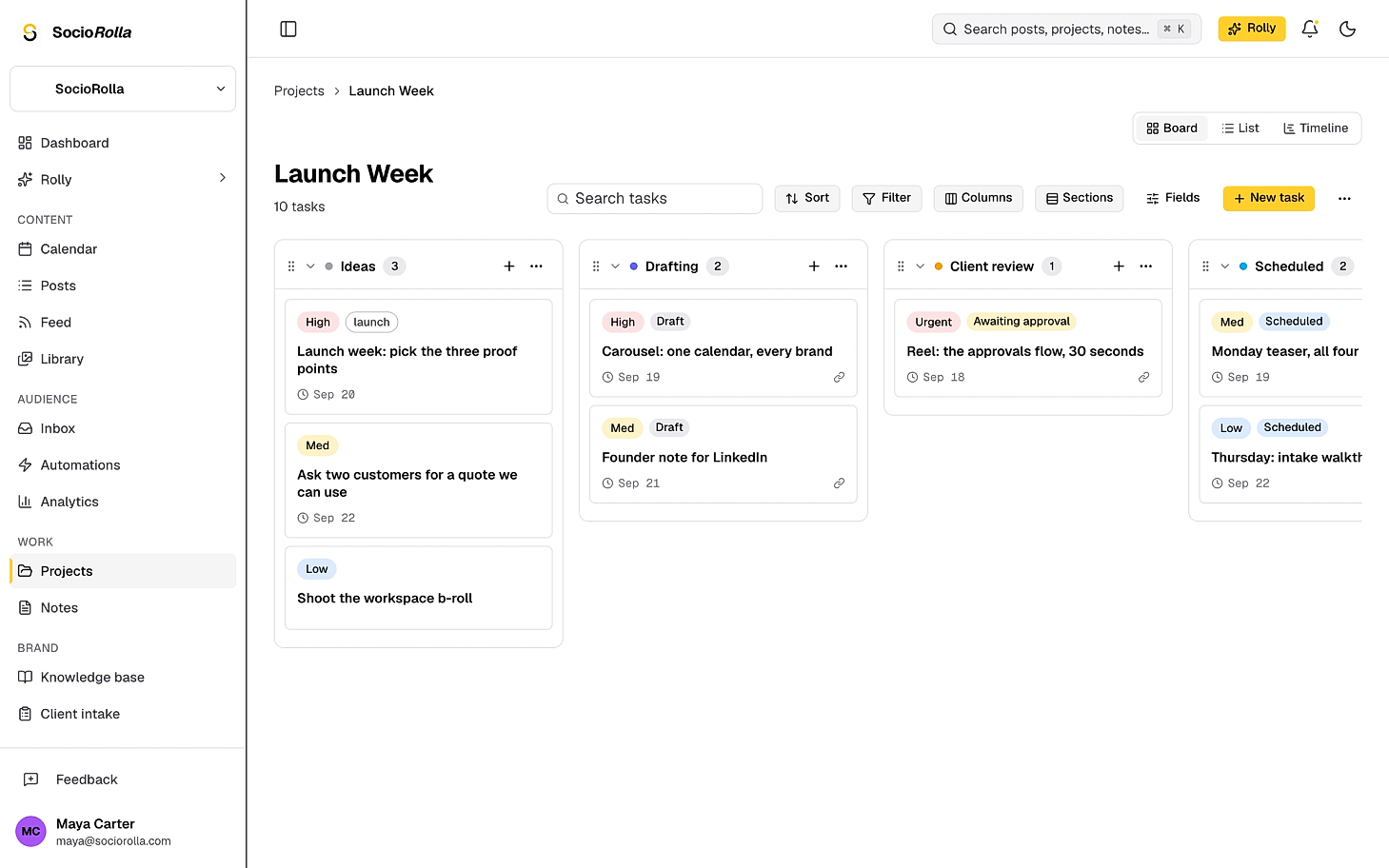
Plan the work, fill in the caption and the date on the card itself, then send it straight to the composer. It stays linked after it goes out.
What it takes off your hands
- A board in one tool, the posts in another
- Copying a caption out of a card into a composer
- “Is this one live?” asked in three places
- A column that says Published when it isn’t
- One card, from idea to published
- Caption, media and date filled in on the task
- A chip that reads the post, not the column
- Sections that move the card as the post moves
Board, list, timeline
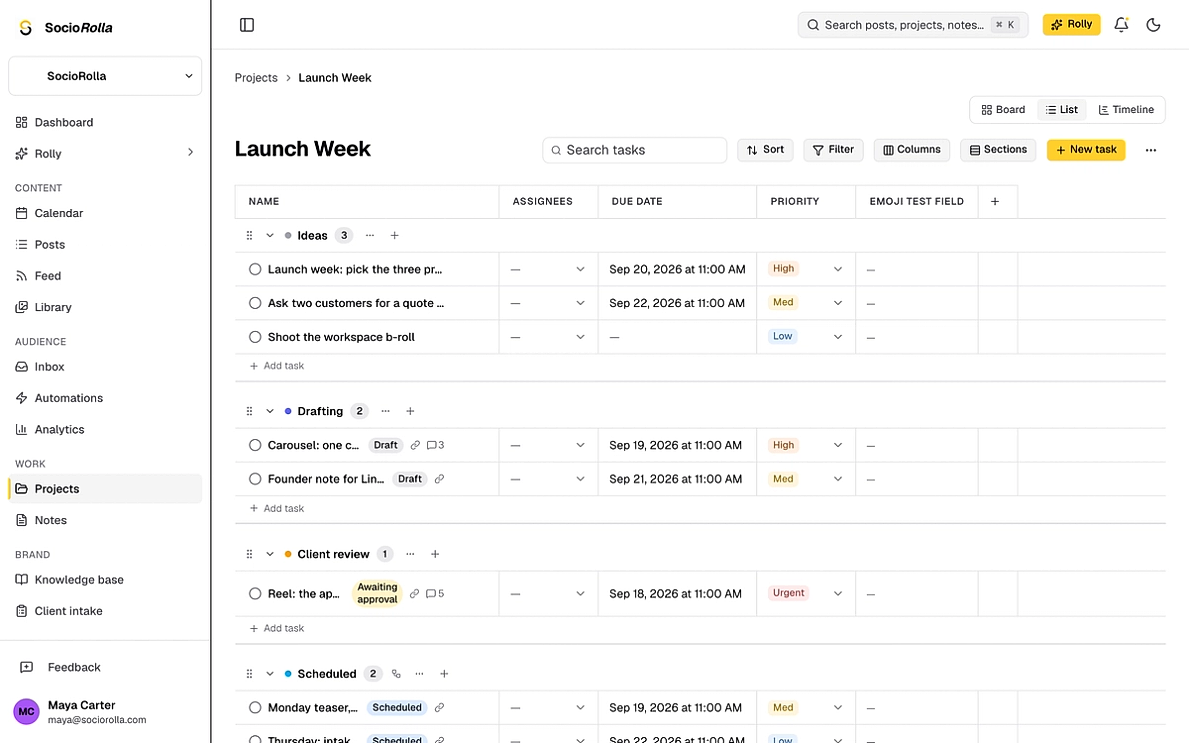
The same tasks, three ways to view them. Board for moving work along, list for scanning everything with its fields as columns, timeline for seeing what lands when.
- Sort, filter and choose which columns show
- Group by section, with a count on each
- Search narrows on the server, not just what is loaded
- Each section pages on its own, so a long board stays quick
Sections that move the work themselves
Give a section a rule and tasks that belong in it automatically move into it. Three triggers, and a section owns each one, so two of them can never pull at the same card.
A linked post reaches a milestone
Scheduled, published or failed. Only affects tasks that are linked to a post.
A task is completed or reopened
The one signal every task has, whether it is a post or not.
A field takes a value
Any single-select field. This is how a project models a workflow we never thought of.
You move it yourself, and that is final
A task a person has moved is stamped as hand-placed, and no rule touches it again.
Define fields once and reuse everywhere
A custom field belongs to the workspace or to one brand, and each project attaches the ones it needs. Define “Content pillar” once and every project can use it, with the same options and the same colours.
- Text, number, date, single and multi select, people and links
- Scoped to the whole organization, or to one brand
- Shown on the card, or kept inside the task
- Saved as a template, so the next project starts set up
- Columns you can hide, per project
- Sections, colours and fields carried over by a template
The entry carries what the post needs
A content project starts with fields that map to the composer. You fill them in while you are planning, and “Convert to post” hands them over; platforms, caption, first comment, media and the date, already filled in.
Platforms
Which accounts it goes to
Caption
Written on the card, in the project
First comment
The hashtag dump, planned with the rest
Images, Video, PDF
Three separate fields, so platform rules stay legible
Post date
When it should go out
What the card will not falsify
The badge reads the post, not the column
A card in “Scheduled” shows what its linked post is actually doing. Drag a card anywhere you like; the badge does not change.
Half-published says so
When some platforms went out and others did not, the chip reads “Published 2/3”. It is never rounded up to published or down to failed.
Done is not a column
Completing a task does not move it. It stays in its section, struck through, so a board still reads as the work, not as a graveyard lane.
Deleting is recoverable
A deleted task goes to a trash you can open, and is purged for good thirty days later.
- Views
- Board, list and timeline
- Auto-move triggers
- Post status, completion, a field value
- Trash
- Recoverable for thirty days
Everything in a project
- Sections you name, colour and reorder
- Assignees, collaborators, tags and priority
- Start and due dates, with a time when it matters
- Subtasks, attachments and comments on every task
- Your own fields, defined once for the workspace
- Sort, filter, search and choose your columns
- Convert a task into a post without retyping it
- A status badge that follows the post it is linked to
- Sections that collect work as it changes state
- A thirty-day trash for anything deleted
Project questions
Is this just another task board?
It is a task board, and then one thing more: a card in a content project carries the fields a post needs, so it can become the post. Fill in platforms, the caption, the media and the date on the task, press Convert to post, and the composer opens already filled in. The task and the post stay linked from then on.
What can move a task on its own?
Three things, and you choose them per section. A linked post reaching scheduled, published or failed. A task being completed or reopened. A single-select field taking a particular value. One section owns each trigger, so two sections can never fight over the same task.
What if I move a task myself?
Then the rules leave it alone, permanently. The moment a person drags or moves a task, it is stamped as hand-placed and automation stops touching it. A board you have to keep rescuing from its own automation is worse than no automation.
Does the column a card sits in mean it is published?
No, and the card is careful about that. The status chip reflects the linked post, never the section. If two platforms went out and one failed it reads “Published 2/3”, which is never rounded up to published or down to failed.
Can I use it for work that has nothing to do with posting?
Yes. A blank project is an ordinary board with sections, assignees, dates, subtasks, attachments and your own fields. The Convert to post button only appears on a project whose fields map to a post, so a plain project never shows it.
Keep exploring
Manage accounts without the overwhelm
Bring one brand or twelve; SocioRolla helps you keep up.