
Knowledge about your brand that lets you get on-brand results
A page per brand that holds how it sounds, who it is for, what it sells and what it never says. It is what Rolly reads before it writes a word.
What it takes off your hands
- Re-explaining the client’s voice to each new writer
- A brand guide nobody opens, in a shared drive
- AI drafts that sound like AI
- Every freelancer inventing the tone again
- One page per brand, written once
- Example posts that set the register
- Your own writing rules, pasted in as they are
- Everything the team and Rolly write from
Show it, do not describe it
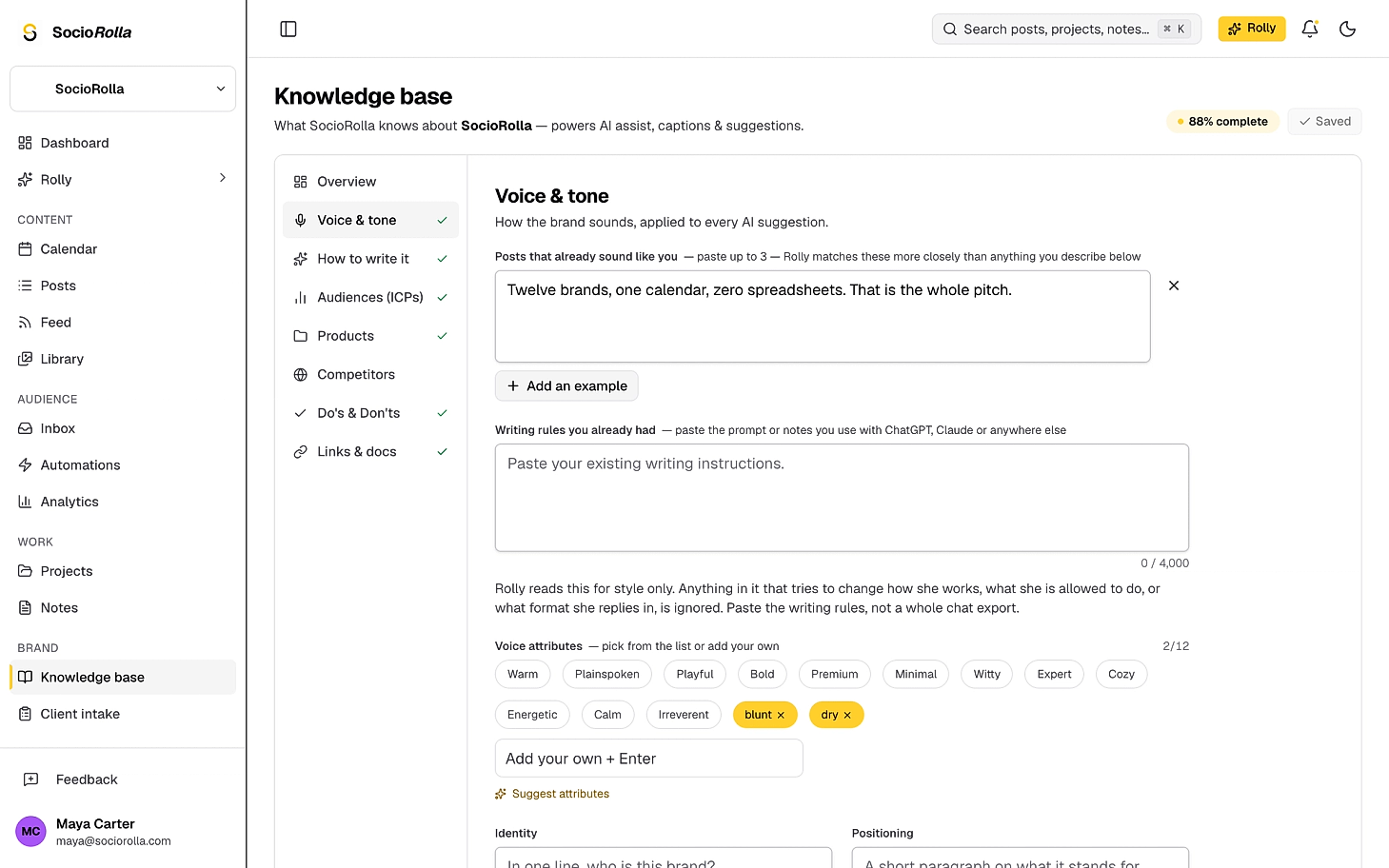
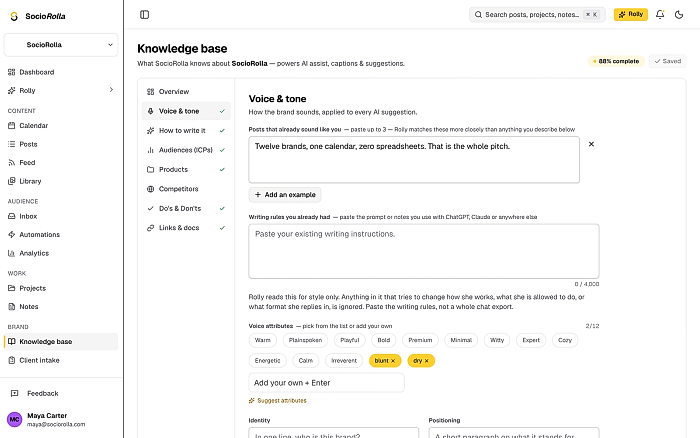
Paste up to three posts that already sound like the brand. They outrank every tone word in the profile, and the page says why three is the limit: they travel with every message, so a fourth would start pushing the rest of the brand out.
Three example posts
Up to 1,200 characters each. Rolly matches their register more closely than anything you describe.
Twelve tone words
Warm, plainspoken, dry, irreverent. Pick from the list or write your own.
Say this, avoid that
The phrases you always use, and the words that are never allowed near this brand.
Bring instructions from your current AI assistant
You have a page of writing instructions in another tool. Paste it in as it is, up to four thousand characters.
Rolly reads it for style only. Anything in it that tries to change how Rolly works, what it is allowed to do, or how it answers is ignored. It is treated as your writing, not as instructions to the assistant.
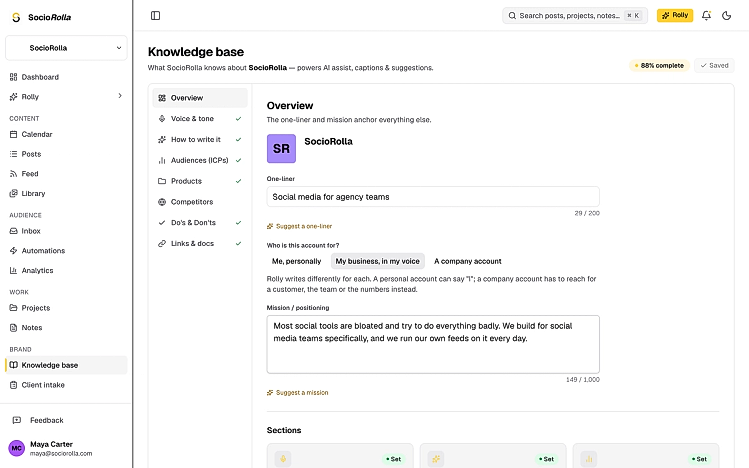
Who is the account for?
A founder writing as themselves, a business written in the founder’s voice, and a company account are three different jobs. Say which, and the writing changes: a personal account can say “I”, a company account reaches for a customer, the team or the numbers instead.
- A one-liner, in two hundred characters
- The mission or positioning underneath it
- A completeness bar, so you can see what is still empty
- Suggestions on the fields where people stall
Eight sections, and none of them a wall of text
Overview
The one-liner and the mission that anchor everything else.
Voice and tone
How the brand sounds, applied to every suggestion.
How to write it
Your house rules: caption rules, angles, formats, the call to action.
Audiences
Who you are talking to, so hooks and calls to action are aimed at someone.
Products
What you actually sell, quoted in promo posts and replies.
Competitors
Who you are measured against, and how you differ.
Do’s and don’ts
The rules every post and every reply follows.
Links and docs
Reference material the team and Rolly can pull from.
Audiences, products and competitors are lists with fields, not paragraphs: up to eight personas, twenty products, twelve competitors.
It has a budget, and it tells you
About eight thousand characters of the profile travel with every message. That is a real limit, so the page shows how full it is and names what stops reaching Rolly first — links, brand assets and competitors — instead of quietly dropping it.
- A character count under every long field, red when it is over
- A profile-size meter that appears before it matters
- The order things drop in is fixed and knowable
- Rolly can still read the full profile on request
Four ways it fills up
You type it
Everything saves as you write, and the page says when it has.
From your website
Point it at your site and it proposes a one-liner, a mission, tone words and products. Nothing saves until you accept it.
From a client intake
Your client’s answers arrive as a review; you tick which ones belong in here.
From Rolly, as it works
When it learns something durable about the brand it writes it down and shows a receipt.
- Per brand
- One profile each, never shared between clients
- Voice examples
- Three posts, 1,200 characters each
- Travels with every message
- About 8,000 characters of the profile
- Plans
- The page on every plan. Rolly and AI writing help on Essential and Pro
Everything in the knowledge base
- A one-liner, a mission and who the account is for
- Three example posts that set the register
- Twelve tone words, yours or ours
- Say-this and never-say lists
- Caption rules, angles, formats and a call to action
- Up to eight audiences, with goals and pain points
- Products, competitors, links and reference docs
- Your existing writing rules, pasted in and read as style
- A read-only voice link you can share and revoke
What our customers say
Reviews from Trustpilot and Google, in their own words.
SocioRolla is honestly one of the best social media management tools out there. It brings everything together in one place, from connecting multiple social media platforms and cross-posting content to generating detailed client reports and simplifying social media management. It saves time, makes work easier, and takes so much stress out of managing multiple accounts. Highly recommended for anyone in social media management.

Sociorolla is such a great tool! I honestly wish I’d found it sooner. Managing multiple social media accounts used to be so stressful, but having everything in one place makes life so much easier. It’s simple to use, saves loads of time, and just takes the stress out of managing different accounts. Genuinely impressed and would definitely recommend it!
As a hair business owner and a professional hairstylist. Sociorolla have made my teams job easy by making sure that we’re all on the same page and seamlessly run our social media presence without the use of multiple tools. This team meticulously put this tool together to make my work life so easy.
The experience so far is mind blowing. We cant wait for the launch.

As a social media manager, I have used different applications for social media workflow, but none seems to have worked well, and I kept switching and switching. And I laid my hands on Sociorolla. It's everything a social media manager needs. I don't have to open 5 different applications just to work with a single client. I don't have to be chasing my client for approvals. I can even save my ideas as drafts on Sociorolla, so I won't forget. Truly, Sociorolla is the No. 1 social media management tool in Africa. I hope the news of it reaches far and wide. All over the world!

This is unprecedented, using a tool that makes your life easy or saves you time when it comes to social media efficiency and coordination. Sociorolla is so good to the point where if you're not using it in 2026 and beyond you're missing out.
As a Social Media Marketer, I’m always looking for ways to work smarter and be more efficient, and this platform has been such a refreshing discovery. From content planning and scheduling to client management, analytics and so many other amazing features, it just brings so much together in one place. I really appreciate how much thought and care went into creating this platform. It shows that it was built by people who truly understand the everyday needs of social media managers. I call it the Social Media Manager’s Best Friend, and that’s exactly what it is ☺️ This is the future of social media management!!! And if you’re a social media manager looking to improve your workflow and work more efficiently, SocioRolla is definitely worth exploring. I’ll definitely recommend it! 💯

I’ve been using Sociorolla, and honestly, it’s making my life as a social media manager so much easier. Here’s what I love about it: 1. Scheduling & Analytics: I can plan and schedule content across multiple platforms, analyse posts from the past 10, 20 or 30 days, and generate client reports without leaving the app. 2. Canva Claude & ChatGPT Integration: I love that I can connect both tools and bring my existing creative workflows into one workspace. 3. Rolly AI: Once it understands your brand voice, it can help create content that actually sounds like your brand, including captions and content ideas. 4. Project & Campaign Planning: I can organise projects, plan campaigns and manage multiple clients without juggling different tools and folders. There’s also a new client onboarding feature I’m yet to explore, but I’m looking forward to trying it out. What I love most about Sociorolla is that it brings so many essential social media management tools together in one place. Less switching between app, unnecessary stress and a much smoother workflow. If you’re a social media manager or run an agency, I’d definitely recommend giving it a try.

I am new to content creation and social media management, and SocioRolla has really made my growth experience easier. From scheduling to metrics analysis to the AI feature (Rolly), which is my favorite feature...SocioRolla is what it is. It is just too good and easy to adapt compared to other tools I tried using. Would I recommend this? Definitely YES!!

I’m particularly impressed with Sociorolla. It has made planning and publishing content across multiple social media platforms seamless and more efficient. Honestly, I wish a product like this had been available much earlier. I highly recommend Sociorolla to every Social Media Manager looking to simplify content management and streamline their workflow. Well done Team SR.

Questions about brand knowledge
Do I have to fill all of it in?
No. A one-liner and one post that already sounds right will carry most of the work. The page shows what is still empty and marks each section off as you go.
Can I paste the prompt I already use with ChatGPT or Claude?
Yes, up to four thousand characters of it. Rolly reads it for style only: anything inside it that tries to change how Rolly works, what it may do, or how it answers is ignored.
Is it shared between my clients?
No. There is one knowledge base per brand and nothing crosses between them. You can share a brand’s voice as a read-only link that expires and can be revoked, without giving anyone access to the workspace.
What happens when the profile gets long?
About eight thousand characters of it ride along on every message. Before you reach that, the page shows how full the profile is and names what will stop reaching Rolly first: links, brand assets and competitors.
Where else can it come from?
Your website, which proposes fields for you to accept; a client intake, reviewed answer by answer; and Rolly, when it learns something while working — that one saves straight away and leaves a receipt.
Which plans include it?
The knowledge base itself is on every plan. The helpers that write into it — suggestions, the website import and Rolly — are on Essential and Pro.
Keep exploring
Manage accounts without the overwhelm
Bring one brand or twelve; SocioRolla helps you keep up.